Access to Department Apps (FSPMS, POS Systems, Book4Time, Transcendent, etc.)
The Work Readiness Request is designed to grant access to many systems and applications when the respective items are selected. It does not cover all accesses that your new employee might need.
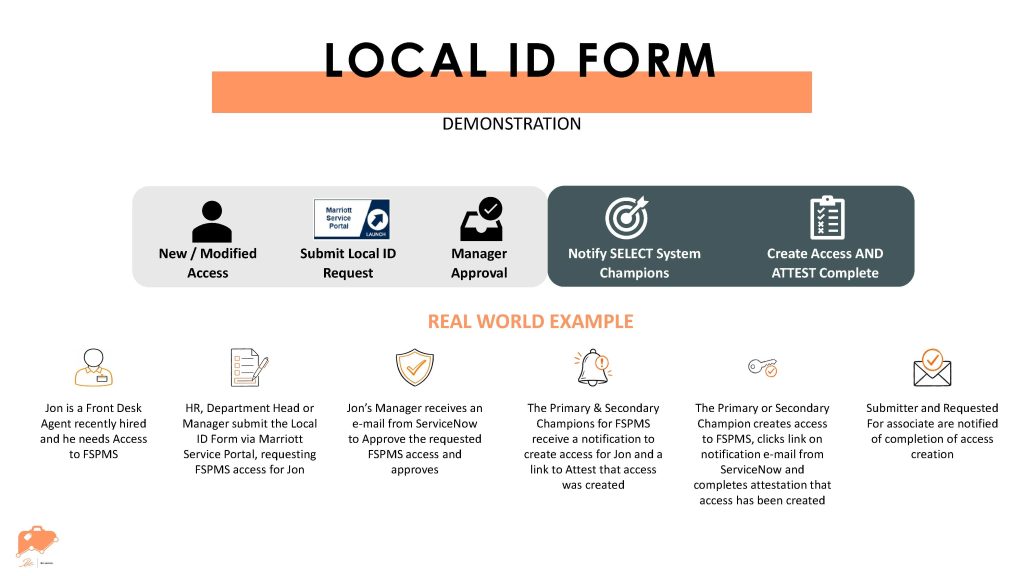
There is a Local ID Request Form that can be used to request access to other apps, such as FSPMS, POS Systems, Book4Time, Transcendent, etc.
For any accesses not represented on these two forms, you will need to partner with department champions who manage different applications and systems to grant your new employee access. This is typically handled through email.
How To:
- Change the Requested For field to the name of your new employee. There will be a list to choose from and you need to have already completed the Work Readiness Request for this employee and have it fulfilled in order to proceed with the Local ID Request.
- Make sure that the manager information is correct and select Yes for this field.
- Fill in the Marsha Code and Application List Options based on the applications of the property that you are requesting access for.
- Once all applications are selected, check the box labeled “Continue with the selection“. This will have a final confirmation before you can submit the request!